Changelog

Follow new updates and improvements to Vero.

Latest Updates

Here's a round-up of the new features, fixes and improvements we've shipped over the past few weeks. We're also still rolling out and improving Subscription Topics, the Preference Center, and Vero's MCP and API, and we'll share more once they're ready for everyone. In the meantime, contact support@getvero.com if you'd like early access.

New

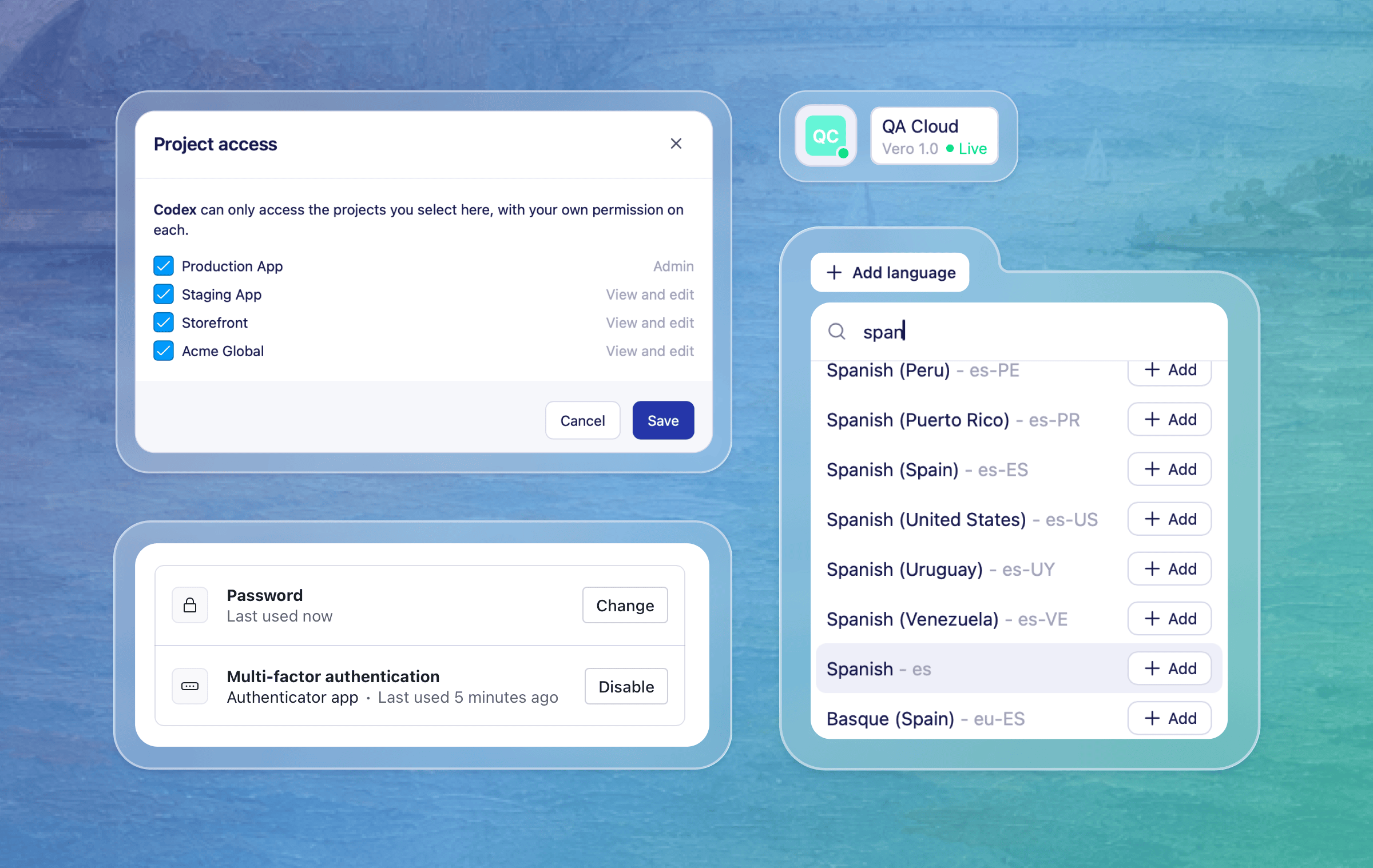
  • Multi-language content in Vero 2.0: You can now send a different language version of your campaign content to each profile in your broadcasts and journeys. This is one of the final steps in bringing all the features of Vero 1.0 to Vero 2.0. As before, Vero uses each profile's locale property to send the right version. The campaign Insights tab now also breaks down performance by language, so it's easier to compare and report on each version. As a reminder, you can also create language versions through Vero's MCP, and they show up right alongside the rest of your campaign content in Vero, so you can review and edit them in one place. Learn how to use languages in Vero 2.0

  • MCP management page: A new MCP page under your account settings lets you view and manage permissions for your connected AI agents like Claude and Gemini. You'll see every connected agent and which projects they have access to. You can limit an agent to specific projects, or remove it to revoke its access entirely. Learn about the Vero MCP

Improved

  • Project status at a glance: The compact sidebar now shows the current project's delivery status. Hover over the icon to see the project name, Vero version and delivery status without expanding the navigation.

  • Multi-factor authentication in Vero 2.0: We've updated the 2FA section in Settings → Security, which allows you to add an extra layer of protection to your account. If you sign in with Google or another identity provider, keep managing your sign-in security through that provider's account settings.

Fixes

  • Duplicate transactional option on broadcasts: In some cases, the transactional option appeared twice when setting up a broadcast. It now only shows once.

  • Recurring newsletter reliability: In some cases, recurring newsletters could time out before they finished sending. They now have more time to run, so scheduled sends complete reliably.

  • Clearer errors for recurring newsletter audiences: If a recurring newsletter's connected audience query fails, the campaign now shows a clearer error message. That gives you a chance to fix the query or data source before the next scheduled send.

  • Workflows after event retries: In rare cases, a retried event that had already been recorded could stop a workflow from being evaluated. Eligible profiles now continue through their workflows as expected.

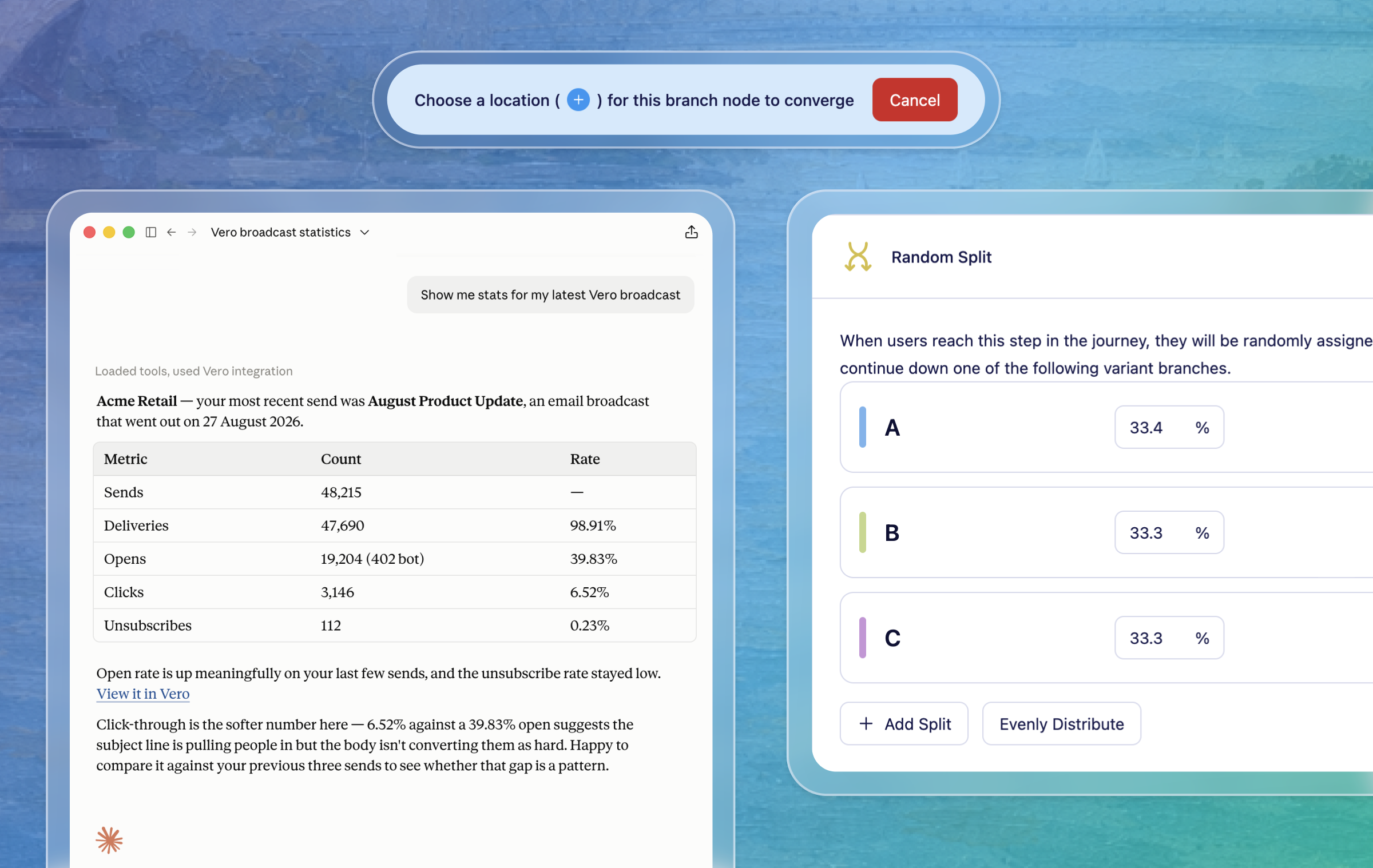
  • Adding branches after random splits: In some cases, adding a True/False branch after a Random Split in a Journey showed an error, even though the branch sat outside the split. You can now add branches in this position.

  • Data feeds in broadcasts created via MCP or API: In some cases, broadcasts created with Vero's MCP tools or the API didn't render {{feed.…}} Liquid tags until you edited and re-saved the content in Vero. Feeds now render as soon as the broadcast is created. If the feed Liquid is invalid, Vero now returns a clear error message.

  • Gemini Enterprise connector: Gemini Enterprise can now discover and use Vero's MCP tools.

  • Improved recurring newsletter monitoring in Vero 2.0: We've improved how we monitor recurring newsletters in Vero 2.0. If a newsletter runs into trouble, we now catch it sooner and recover it automatically where we can, so your scheduled sends keep going reliably.

  • More reliable segment refreshes before sends: We've improved how segments are refreshed ahead of scheduled newsletters, so your audiences are ready in time and your newsletters go out when expected.

  • Liquid errors in message logs: If a message fails because of a Liquid syntax error, it now shows as a failure in the message logs with the error details. That makes it easier to find and fix the broken tag.

For any questions, don't hesitate to reach out to support@getvero.com.
NewImprovedFixedVero 1.0Vero 2.0

Latest Updates

It’s been a big few weeks — we’ve introduced new Journey building blocks, added more MCP tools and API endpoints and shipped a solid run of fixes and improvements. We’re also making good progress on some long awaited features, which we will be bringing you more info about soon.

As a reminder, the Campaigns API and MCP server are enabled on a per-account basis. Contact support@getvero.com if you'd like access.

New

  • Preference Center V2 (early access) – Group your messages into topics and give recipients a hosted page where they can choose what they hear about, instead of unsubscribing from everything. Topic preferences are respected across email, SMS and push, and can be set through the API or MCP. Available on request while we work towards the full rollout in Vero 2.0 — get in touch at support@getvero.com to request access and read the help docs to find out more.

  • Random Split node in Journeys – A new Random Split node sends a set percentage of profiles down each path, so you can test variations of a journey against each other. Use it to compare message content, timing or channel choices within a single journey, rather than building and maintaining separate journeys to do the same thing.

  • Remove Exit nodes from Journeys – We've added a handy new way to remove exit nodes and rejoin them to different places in your journey. This makes it easy to undo adding an exit node, and adds another bit of flexibility when you're reshaping a journey that's already live.

  • A new sign-in experience – Vero has a new login page and a single, consistent sign-in, sign-up and logout flow across Vero 1.0 and Vero 2.0. Email and password and Google sign-in both work as before, and your existing login details carry across — there's nothing you need to do differently.

  • Connect AI clients to Vero with OAuth - MCP-enabled AI clients can now connect to Vero by signing in through your browser, rather than being configured with an API key. Authorise the client once and it picks up your existing Vero access.

  • Trigger Vero events from MCP - You can now trigger a Vero event for an existing customer profile directly from an MCP-enabled workflow, allowing events to start configured journeys or campaigns.

  • Journey and broadcast metrics in MCP - You can now retrieve performance metrics for journeys and broadcasts through MCP, including sends, deliveries, opens, clicks, unsubscribes, reporting dates, and per-message or per-run breakdowns.

  • Broadcast metrics in public API - Broadcast performance data is now available in the public API, including sends, deliveries, opens, clicks, unsubscribes, and per-run performance for recurring broadcasts.

  • Search across broadcasts, journeys, and messages - You can now search across broadcasts, journeys, and their messages in Vero's MCP tools. Results are grouped by type and include short snippets to help find campaign content faster.

  • Localised journey content through the API – New v2 endpoints let you write localised content for journey messages, so translations can be created and updated from your own systems instead of being maintained by hand in the journey builder. This brings journey messages in line with how localised content is already handled elsewhere in Vero.

Improved

  • Faster segments and reporting – Segment refreshes, timeline charts and usage counts all run noticeably quicker. The difference is most obvious on larger accounts, where segment counts and reporting views previously took the longest to load.

  • Unverified channel warnings – Vero now flags an unverified sending channel while you're setting up a campaign, rather than at send time. You can sort out verification before scheduling, instead of finding out about it when the campaign is due to go out.

  • Improved MCP validation for broadcast content - AI clients now get clearer guidance on supported content formats for email, SMS, and push messages, with earlier and more helpful validation errors for invalid requests.

  • Journey message lists are paginated in MCP – Large journeys now return in pages instead of one oversized response.

  • Removing From and To email addresses – Before you delete an email address, Vero now shows which campaigns use it in a From or To field, so you can see exactly what will be affected and how.

Fixes

  • Faster email event reporting – Email activity reporting is now more reliable. We fixed an issue that could delay delivery, open, and click events from appearing in campaign reporting. New email events will now show up more promptly across your campaign statistics.

  • Correct verification status for Vero Managed channels – Vero Managed email channels would sometimes show an incorrect “unverified” warning when setting up a campaign with a Vero managed email provider.

  • Webhook payloads restored – _comm_occ_id and message _variation_id are back in webhook payloads after being dropped in a recent release. If you use these fields to match webhook events to a specific send or variation, no changes are needed on your side.

  • Archiving campaigns with broken conditions – In some cases a campaign with corrupt conditions couldn't be archived, leaving it sitting in your campaign list with no way to tidy it away. These campaigns can now be archived as normal.

  • Audience update dialog – In some cases the confirm button in the audience update dialog did nothing, so the change wasn't applied. Confirming now saves the update as expected.

  • Import progress – Progress didn't update for imports sourced from a segment, which made a running import look like it had stalled. Progress now updates throughout the import.

For any questions don't hesitate to reach out to support@getvero.com

Latest Updates

Following our recent API and MCP launch, we’ve made several updates across Vero to make campaign management faster, API access easier to manage, and day-to-day campaign work more reliable.

As a reminder, we’re enabling the newly released Campaigns API and MCP server on a per account basis. Contact support@getvero.com if you would like access.

⭐️ New and Improved:

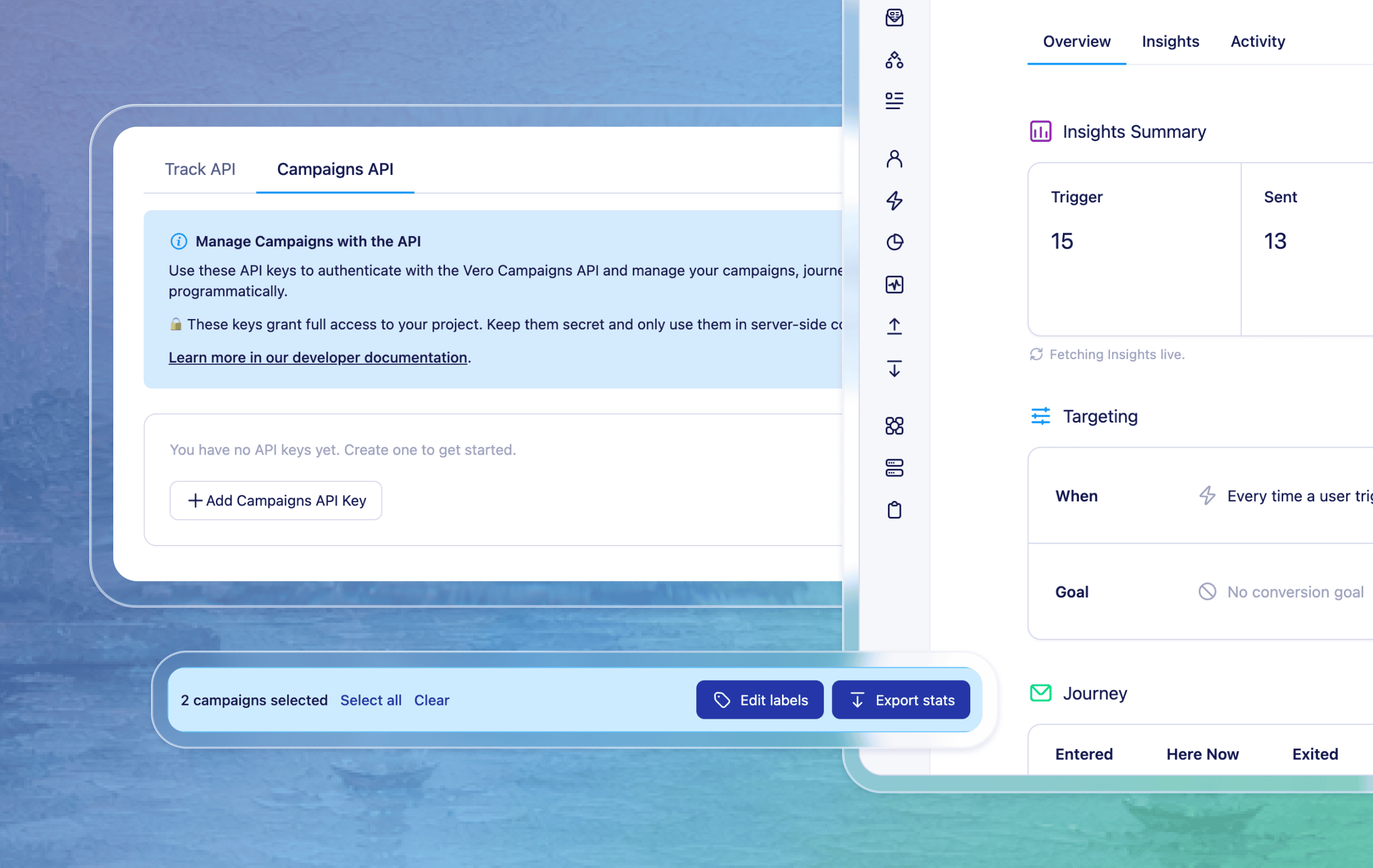
  • Bulk actions for campaigns in Vero 2.0 - You can now select multiple campaigns and take action on them together, including exporting campaign stats and adding or removing labels across matching campaigns. This makes it faster to organise, review, and manage larger campaign lists.

  • A more compact campaign setup experience - We reorganised the campaign screen into clearer “Targeting” and “Message/Journey” sections, and refreshed the layout so it’s easier to scan and edit.

  • Easier Campaigns API key access in Vero 2.0 - Vero 2.0 now includes an API Keys section in project settings, so admins can create, copy, review, and revoke Campaigns API keys and Track API keys from the same place. This makes it easier to set up and manage the Campaign API keys needed for MCP-powered workflows.

  • Clearer API key settings in Vero 1.0 - We also updated API key labels and actions in Vero 1.0 to make it clearer which keys are used for tracking and which are used for Campaigns API access.

  • Campaign links returned from MCP-powered broadcast tools - When a broadcast is created or updated through MCP-powered tools, Vero can now return a direct campaign link, making it easier to review the campaign in Vero before scheduling or sending.

  • Filter nodes for Journeys in Vero 2.0 - To match our Vero 1.0 functionality, Journeys now support Filter logic to control who continues through a journey - these use the same conditions as true/false nodes and simply eject the users that don’t meet the conditions.

  • Transactional setting for each Journey email in Vero 2.0 — You can now independently mark every email as transactional or not, so you can send to unsubscribed profiles where appropriate in your journey. This is an improvement over Vero 1.0 which only allows setting the whole Workflow transactional.

  • Journey UI updates - We tidied up the journey canvas at smaller screen sizes, kept editing controls easier to reach, improved the default preview zoom, and added keyboard shortcuts for faster navigation.

🐛 Fixes:

  • Open campaigns in a new tab - We fixed a small annoyance that prevented opening campaigns in new tabs using the standard cmd/alt + click modifier shortcut.

  • Scheduled campaign times now display more reliably - We fixed an issue where scheduled times could appear incorrectly in campaign status controls, and aligned scheduling to use the start of the hour by default.

  • More reliable profile counts - We fixed an issue that could cause profile counts for All, Subscribed, and Unsubscribed views to appear inconsistent in some cases.

  • More accurate segment refreshes - We improved how segment membership updates handle duplicate profile records, helping refreshed segments stay accurate.

For any questions don’t hesitate to reach out to support@getvero.com

Earlier updates